Request Lifecycle
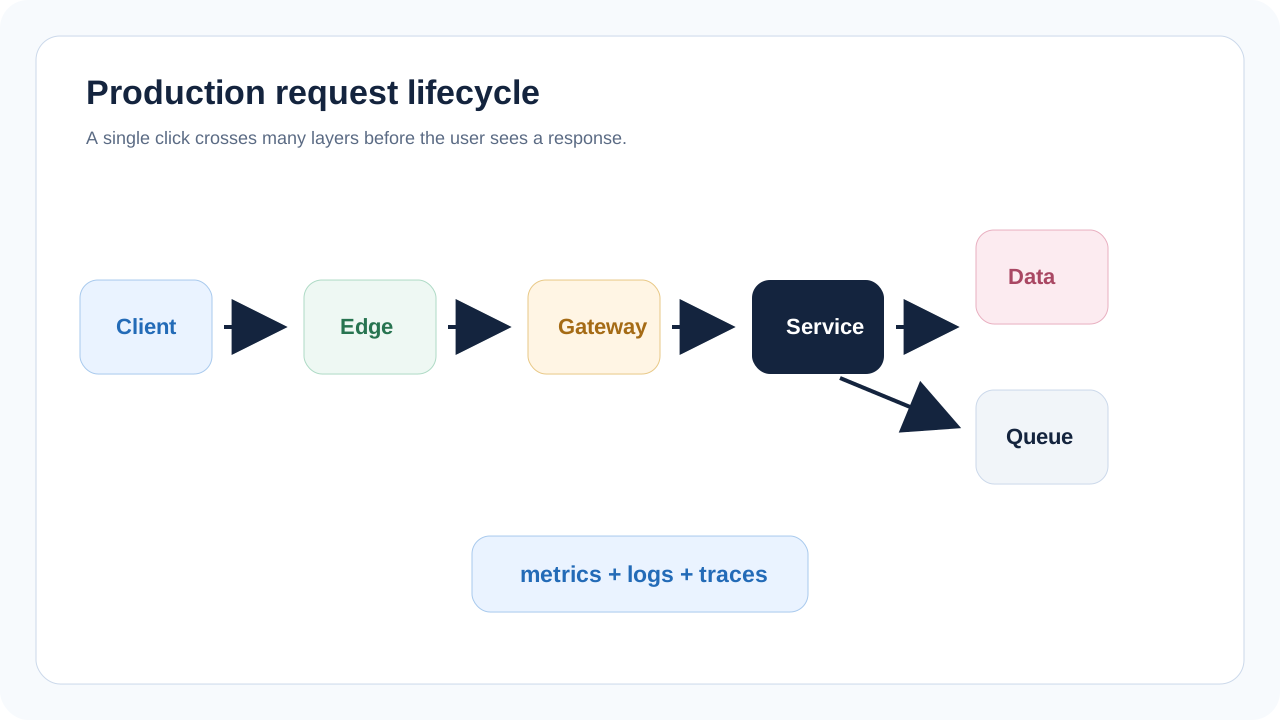
Follow a request from client to edge, gateway, service, cache, database, queue, observability, and response.
What you will be able to do
A request is not just a function call. In production it crosses clients, networks, edge layers, gateways, services, caches, databases, queues, and monitoring systems.
Request Path Overview
When a user taps a button, the system must authenticate the caller, validate the request, route it to the right service, perform the needed work, record observability data, and return a response quickly enough for the product experience.
| Stage | What happens | Common risk |
|---|---|---|
| Client | Builds request and handles loading/error states | Retries can create duplicates if write API is not idempotent. |
| Edge/CDN | Terminates TLS, caches static or cacheable responses | Incorrect caching can expose stale or private data. |
| Gateway/load balancer | Routes traffic and applies policies | No rate limit or weak auth can overload services. |
| Service | Validates, authorizes, executes business logic | Too much work in the synchronous path increases latency. |
| Data layer | Reads/writes durable state | Bad indexes or locks slow the request. |
| Queue | Defers background work | Missing retry/DLQ causes silent data loss. |
| Observability | Records metrics, logs, traces | No correlation ID makes incidents hard to debug. |
Scenario: User Uploads a Profile Photo
A profile photo upload appears simple. But a production request may validate file type, authorize the user, store the original image, enqueue thumbnail generation, update the user profile, and return a URL.
| Step | Synchronous or async? | Reason |
|---|---|---|
| Authenticate user | Synchronous | Need to know who is uploading. |
| Validate file metadata | Synchronous | Reject unsafe or oversized files early. |
| Store original image | Synchronous or direct-to-object-storage | Need durable object before success. |
| Generate thumbnails | Async | CPU work should not block the user. |
| Update profile record | Synchronous | User should see new avatar state. |
| Scan image for policy/security | Async or gated depending on product | Trade-off between speed and safety. |
Timeouts, Retries, and Idempotency
Networks fail. Services slow down. Clients retry. A production request lifecycle must define timeouts and retry behavior so the system does not accidentally duplicate writes or overload itself.
| Concept | Beginner meaning | Example |
|---|---|---|
| Timeout | Maximum time caller waits | Gateway times out after 10 seconds. |
| Retry | Try again after failure | Client retries a safe read after network failure. |
| Idempotency | Same request can be repeated safely | Same upload session ID should not create many profile records. |
| Correlation ID | ID carried through logs/traces | Debug one failed checkout across gateway, service, and database. |
| Backoff | Wait longer between retries | Avoids retry storms when a service is already overloaded. |
Design principle
Keep the synchronous request path as small as the product allows. Move slow, retryable, or fanout work into background processing.
Cloud Request Lifecycle
| Layer | AWS | GCP | Azure |
|---|---|---|---|
| Edge/CDN | CloudFront | Cloud CDN | Azure Front Door/CDN |
| API entry | API Gateway/ALB | API Gateway/Cloud Load Balancing | API Management/Application Gateway |
| Compute | Lambda/ECS/EKS | Cloud Run/Cloud Functions/GKE | Functions/Container Apps/AKS |
| Object storage | S3 | Cloud Storage | Blob Storage |
| Queue | SQS/EventBridge | Pub/Sub/Cloud Tasks | Service Bus/Event Grid |
| Tracing | X-Ray/CloudWatch | Cloud Trace/Cloud Monitoring | Application Insights/Azure Monitor |
What to Observe
A request lifecycle is only production-ready if engineers can understand it during normal operation and during incidents.
| Signal | What it tells you |
|---|---|
| Request rate | How much traffic is entering the system. |
| Error rate | Which flows are failing and how often. |
| Latency percentiles | Whether users are seeing slow responses. |
| Dependency latency | Whether database, cache, or external provider is slowing the request. |
| Queue depth | Whether async workers are keeping up. |
| Trace spans | Where time is spent across services. |
Beginner Mistakes
- Putting image processing, email delivery, and analytics inside the user-facing request path.
- Retrying write requests without idempotency.
- Ignoring correlation IDs and then being unable to debug production failures.
- Caching private or user-specific responses incorrectly.
- Assuming the database is the only place a request can fail.
Guided Practice
Practice task
Trace the request lifecycle for submitting a comment on a blog post. Identify what must happen before response and what can happen after response.
Sample Answer
| Before response | After response |
|---|---|
| Authenticate user | Send notification to post author |
| Validate comment text | Update search index |
| Authorize access to post | Update analytics counters |
| Store comment durably | Run moderation enrichment if not blocking |
| Return commentId and createdAt | Fan out feed/inbox updates if needed |
Before You Continue
- You should be able to trace a request across system layers.
- You should know why sync paths should stay small.
- You should understand timeout, retry, idempotency, and correlation ID basics.
- You should be ready to decide where service boundaries belong.